Issues & Resolution
Support
Track and resolve construction issues, safety concerns, and buyer requests from once central system. Keep your team
Ticket Management (Available Now)
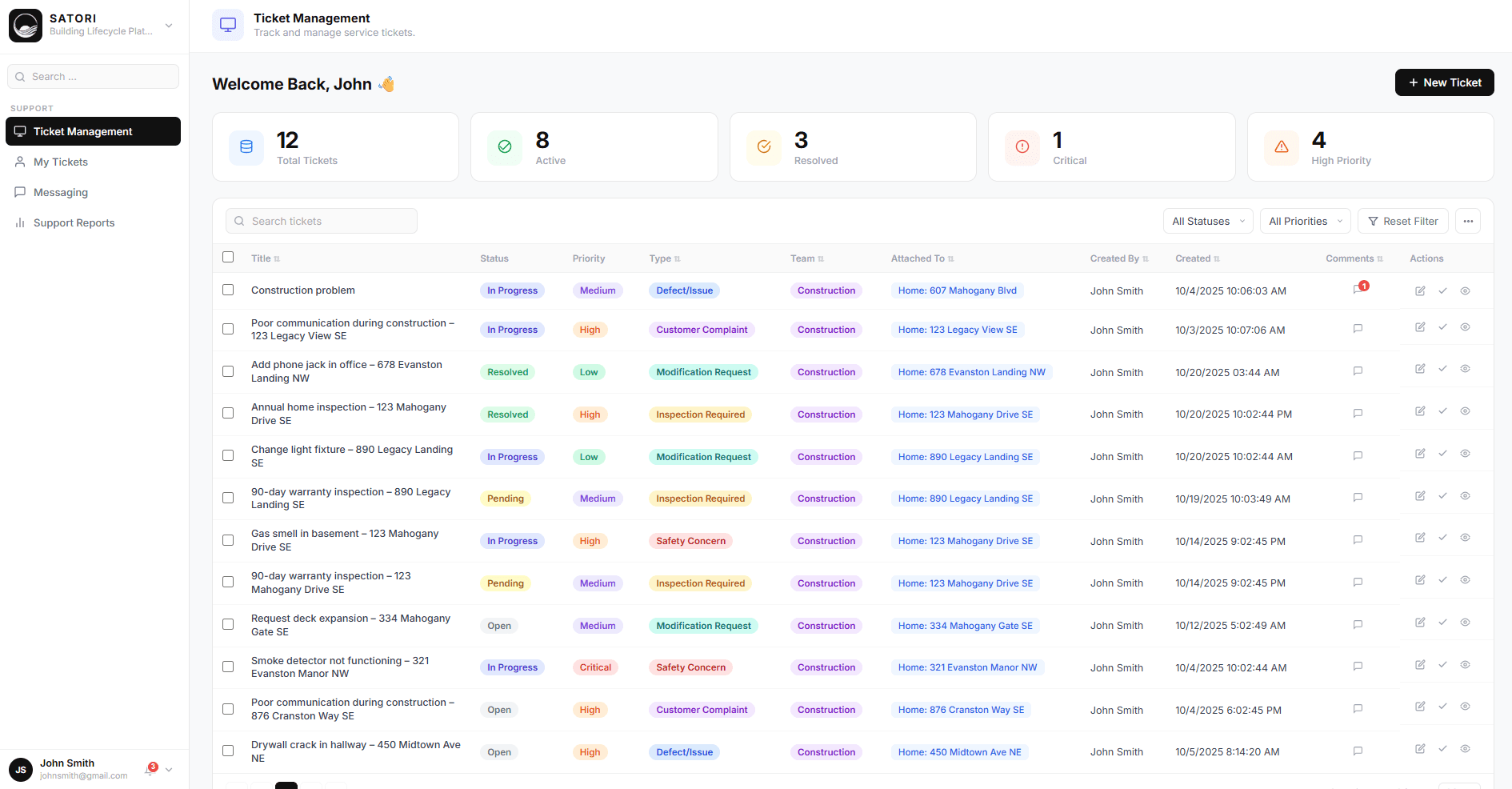
Centralized system for tracking every construction issue, safety concern, inspection request, and customer complaint. Create tickets, assign them to teams, set priority levels, and monitor status from open to resolved. Filter by status, priority, type, team, or attached home. See total active tickets, resolved issues, and critical items requiring immediate attention—all in one dashboard.
Ticket Types You Can Manage
Construction Defects
Track quality issues discovered during builds or post-completion inspections. Document problems like poor communication during construction, late deliveries, or construction defects that need remediation.
Safety Concerns
Flag safety issues immediately for urgent resolution. Create tickets for gas smell in basements, smoke detector malfunctions, or any safety hazard requiring immediate attention.
Inspection Requests
Manage requests for 90-day warranty inspections, pre-drywall inspections, or final walkthroughs. Track inspection scheduling and completion.
Modification Requests
Handle buyer change requests like deck expansion, light fixture location changes, or other customizations during construction.
Customer Complaints
Document and resolve buyer concerns systematically. Maintain records of complaints response times, and resolutions to improve customer satisfaction.
Why Systematic Issue Tracking Matters
Nothing Gets Forgotten
Without a ticket system, issues get buried in email chains, text messages, and verbal conversations. Superintendents forget, buyers get frustrated, and problems compound. A central ticket system ensures every issue is documented, assigned, and tracked to resolution.
Accountability & Transparency
Every ticket shows who created it, when it was created, who's responsible for resolving it, and current status. Buyers can see their concerns are being addressed. Management knows which team members close tickets quickly and which let them linger.
Identify Recurring Problems
When the same issue appears across multiple homes—like "poor communication during construction" or repeated safety concerns—you have data showing it's a systematic problem, not a one-off. Use ticket history to improve processes and prevent future issues.
Audit Trail for Warranty Claims
When buyers come back months later claiming "I told you about this problem during construction," you have timestamped tickets proving what was reported, when, and how it was resolved. Protect your business with documented evidence.
Key Capabilities
Priority Levels
Mark tickets as Critical, High, Medium, or Low to ensure urgent issues get immediate attention.
Status Tracking
Move tickets through Open, In Progress, Pending, and Resolved statuses with clear workflow.
Home Linking
Attach every ticket to a specific home address for complete project history.
Team Assignment
Route tickets to the appropriate team (Construction, Sales, etc.) for faster resolution.
Comment Threads
Maintain conversation history on each ticket for complete context and collaboration.
Filter & Search
Quickly find tickets by status, priority, type, team, home, or creator.
Bulk Actions
Select multiple tickets for bulk status updates or assignments.
Table & Card Views
Switch between detailed table view and visual card layout based on your workflow preference.
Next Module